Mac App Store version is coming soon.

KeepClips — Free Clipboard Manager for Mac with History, OCR & Privacy

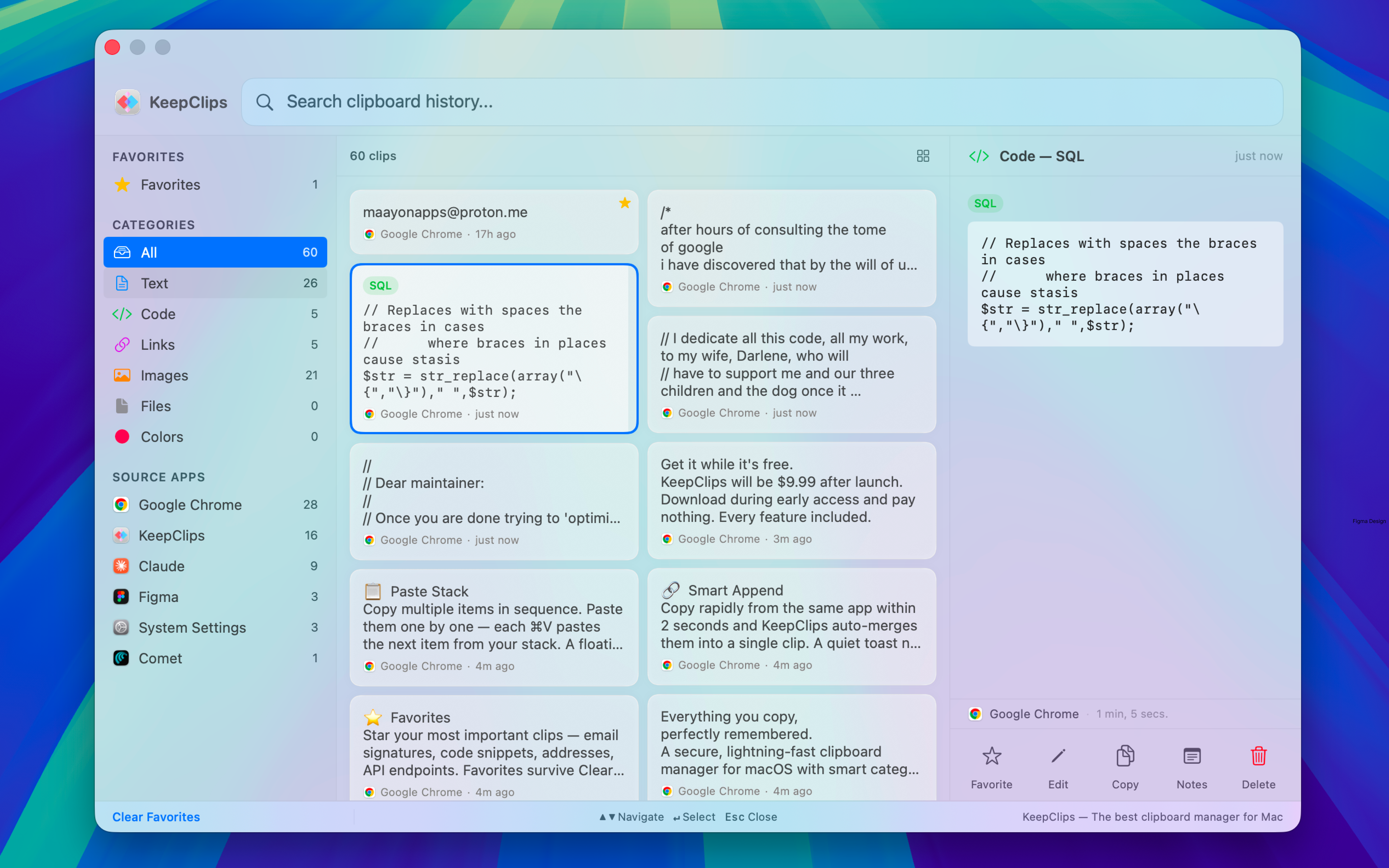
Everything you copy,
perfectly remembered.

A secure, lightning-fast clipboard manager for macOS with smart categories, built-in OCR, and sensitive content blocking.

Free during early access · $9.99 after launch
Download for free
Coming soon
Requires macOS 14.0 (Sonoma) or later · Apple Silicon & Intel
First time opening? macOS may show a security prompt

KeepClips is currently being notarized with Apple. macOS may block the first launch. Here's how to open it:

  1. Double-click KeepClips — if you see "KeepClips Not Opened", click Done (not Trash)
  2. Open System Settings → Privacy & Security
  3. Scroll down to find "KeepClips was blocked" and click Open Anyway
  4. Enter your password — KeepClips will launch and work normally from now on

One-time step while Apple notarization is in progress.
Features

Your clipboard was never
this capable.

Categories, OCR, privacy shields, multi-file recovery — features you didn't know to ask for.

6 Smart Categories

Every clip is automatically sorted into Text, Code, Links, Images, Files, or Colors — each with its own icon and rich preview. Filter by category, by source app, or both. Smart deduplication keeps your history clean.

Built-in OCR

Apple Vision extracts text from screenshots, memes, and slides — locally, with no network request. Every image in your history becomes searchable by the words inside it.

Multi-File Recovery

Copied 5 files from Finder? KeepClips stores them as a single grouped item and restores all of them in one paste. No other clipboard manager treats multi-file copies as a first-class feature.

New

Favorites

Star your most important clips — email signatures, code snippets, addresses, API endpoints. Favorites survive Clear All History and auto-purge. Up to 20 clips, always within reach.

Full-Text Search

One search bar searches everything: plain text, OCR results, app names, link titles, and domains. Live filtering as you type. Combine category and source app filters to narrow results instantly.

Sensitive Content Shield

Auto-blocks credit cards, SSNs, and API keys — including Stripe live keys, AWS access keys, and GitHub tokens — before they ever reach your history. Password managers are always ignored automatically.

Edit Clips

Right-click any text, code, or link clip and edit it in place. Fix a typo, trim whitespace, or tweak a URL — changes are saved to your history with an updated hash.

Smart Append

Copy rapidly from the same app within 2 seconds and KeepClips auto-merges them into a single clip. A quiet toast notification confirms "Appended to previous clip."

Add to Apple Notes

Right-click any clip → Add to Notes. Creates a new note with one click. Save research, quotes, code references, or links to your Notes library instantly.

Multi-Select & Bulk Actions

⌘-click to pick individual clips. ⇧-click for range selection. Then bulk-favorite or bulk-delete in one action. Clipboard cleanup in seconds.

Paste Stack

Copy multiple items in sequence. Paste them one by one — each ⌘V pastes the next item from your stack. A floating HUD shows what's coming next.

Menu Bar Quick Access

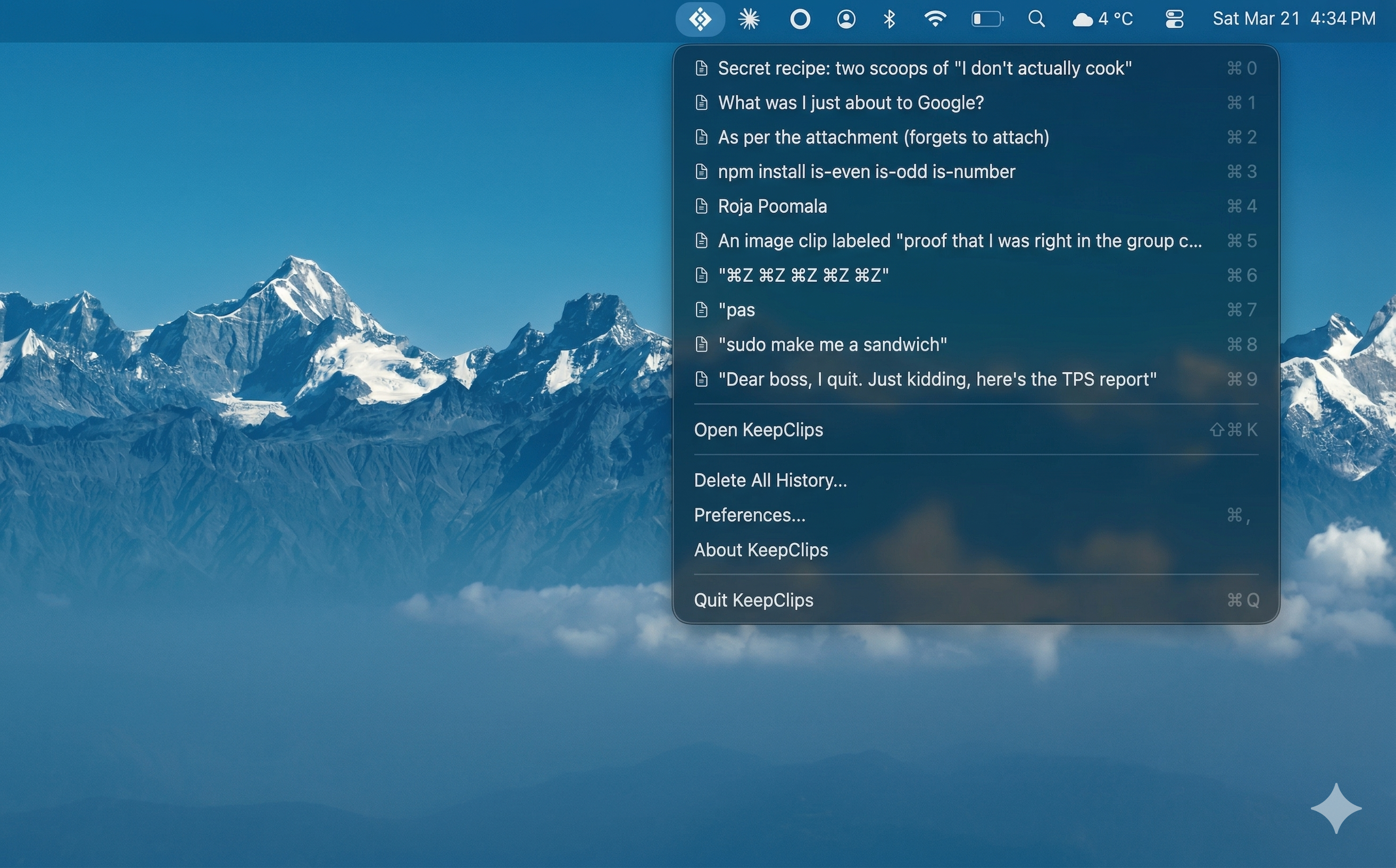
Your last 10 clips are always available from the menu bar with ⌘0–9 shortcuts. Each clip shows its category icon, source app, and relative timestamp.

Rich Link Previews

URLs pull titles, domains, and thumbnails. Cached locally for instant repeat lookups. Opt-in — network disabled by default.

Privacy

Your data is yours.

KeepClips runs inside Apple's App Sandbox with no network entitlement by default. Your clipboard data — every text, image, file, and snippet — stays on your Mac and is never uploaded anywhere.

We use minimal, anonymous diagnostics (crash reports via Sentry and usage counts via TelemetryDeck) to improve the app. Network access is also used for Sparkle auto-updates. But your clips and personal content are never sent externally.

Sensitive Content Shield

Blocks credit cards, SSNs, and API keys the moment you copy — before they're ever stored. See full details in Features above.

App-Level Exclusions

Add any app to the Ignored Applications list. Nothing copied from that app will ever be captured.

Auto-Purge

Wipe unpinned history when your screen locks or the app restarts. Favorites are always excluded from purge.

Custom Shortcuts

Every hotkey is configurable via a native macOS shortcut recorder. Global hotkey default: ⌃⌥C. No config files needed.

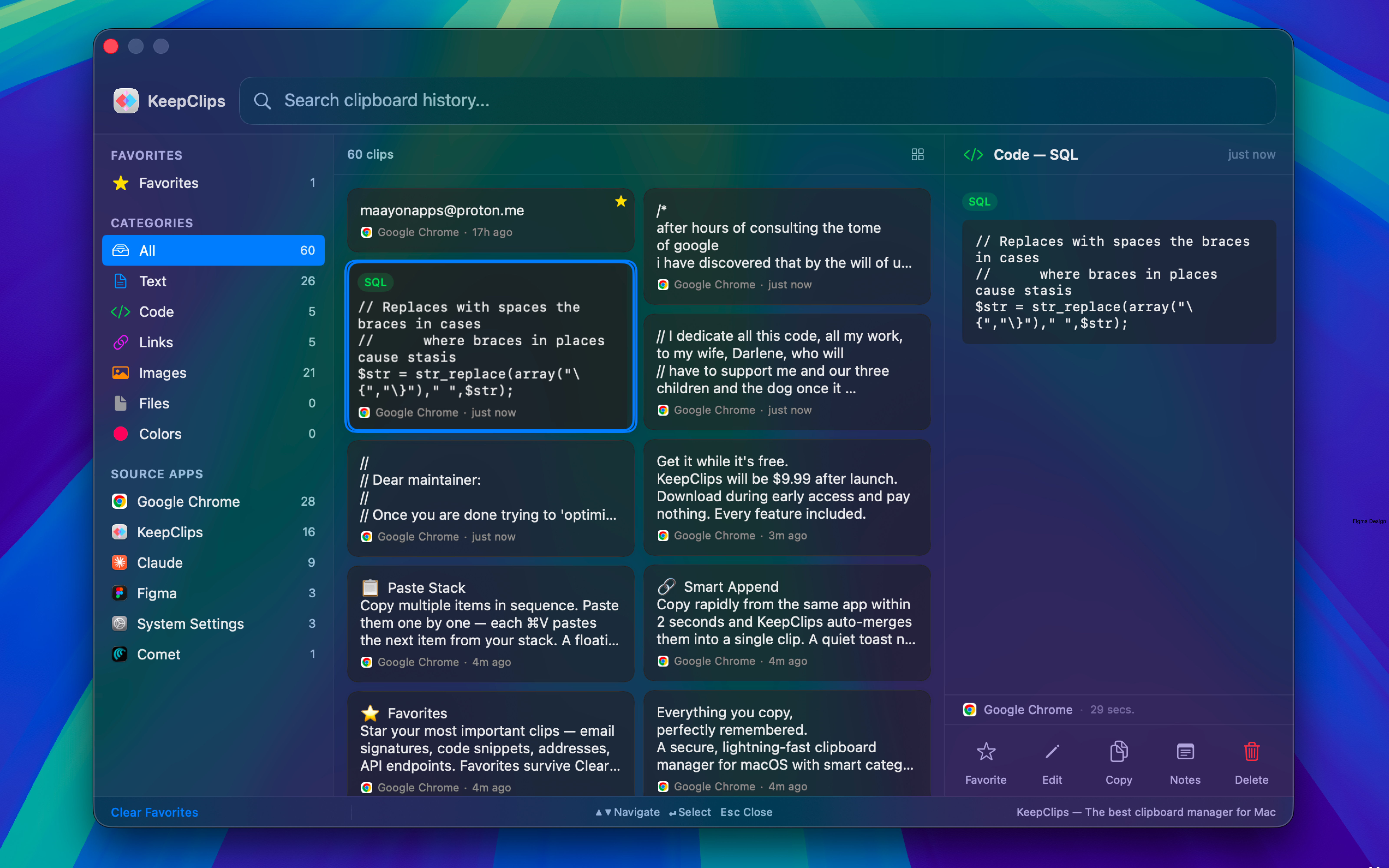
Dark & Light Mode

Adapts to your system appearance automatically.

Accessibility

Full keyboard navigation. VoiceOver labels on every interactive element. Arrow keys to browse, Return to paste and close, Escape to dismiss.

Use Cases

Built for how you work.

Developers

Recall code snippets, terminal commands, and error logs. Filter by VS Code, Xcode, or Terminal. Smart Append auto-chains rapid copies. Sensitive Content Shield catches API keys from config files before they hit your history.

Designers

Reuse hex colors and RGB values. The Colors category renders swatches at a glance. Copy text from mockups with built-in OCR. Send anything to Apple Notes for your reference library.

Writers & Researchers

Track links, quotes, citations, and drafts across sessions. OCR extracts text from screenshots and slides. Favorites pin your most-referenced material permanently.

Everyone

Never lose something you copied. Whether it's a link you copied two days ago, a phone number from a PDF, or a snippet you forgot to save — KeepClips finds it in under a second.

Compare

How KeepClips compares.

Looking for a Maccy alternative or a Paste alternative without a monthly subscription? KeepClips is free during early access and $9.99 one-time — no recurring fees, ever.

Feature KeepClips Maccy CopyClip Paste ClipBook
Price Free (early access)
$9.99 after launch
Free / $10 Free $3.99/mo $9.99
Content Types 7 with rich previews Text only Text only Text, images 6 types
Searchable OCR Copy only
Sensitive Content Shield
Multi-File Recovery
Auto-Purge on Screen Lock

Feature comparison based on publicly available information, March 2026. If anything is inaccurate, please let us know.

FAQ

Frequently Asked Questions

Is KeepClips free? +

KeepClips is free during early access with every feature included and no restrictions. After launch, it will be a one-time purchase of $9.99. No subscription, no recurring fees. Early adopters who download during early access will be taken care of.

Will KeepClips always be free? +

No. KeepClips will become a $9.99 one-time purchase after the early access period ends. Early adopters who download now will be taken care of. We'll share details before any transition.

Is there a subscription? +

No. KeepClips is a one-time purchase. No subscription, no recurring fees, no in-app purchases.

Can I install KeepClips via Homebrew? +

Yes. Run brew tap Maayon-Apps/keepclips then brew install --cask keepclips. KeepClips will install and launch into your menu bar. Updates are handled through Sparkle auto-update, not brew upgrade.

Does KeepClips send my clipboard data anywhere? +

No. Your clipboard data stays on your Mac. The app runs inside Apple's App Sandbox with no network entitlement by default. Network access is used only for crash reports (Sentry), anonymous usage counts (TelemetryDeck), and auto-updates (Sparkle). Your clips and personal content are never sent externally.

How does KeepClips protect sensitive data? +

Two layers. The Sensitive Content Shield auto-detects and blocks credit card numbers, Social Security Numbers, and API keys (Stripe, AWS, GitHub PATs) before they're ever stored. Additionally, content from popular password managers is always ignored automatically — no setup required. You can also add any app to the Ignored Applications list.

Can KeepClips read text from images? +

Yes. Built-in OCR powered by Apple's Vision framework extracts text from screenshots, photos, memes, and slides — locally, with no network request. The extracted text is indexed and fully searchable across your entire clipboard history.

What content types does KeepClips support? +

Six categories: Text, Code, Links, Images, Files, and Colors. Each has its own icon, rich preview, and metadata. Code clips show syntax context and source app. Links show domain and title. Colors render hex and RGB swatches. Everything is categorized automatically.

What macOS version do I need? +

macOS 14.0 (Sonoma) or later. Works on Apple Silicon and Intel Macs.

How many favorites can I pin? +

Up to 20. Favorites stay pinned at the top of your history and are excluded from Clear All History and auto-purge. A dedicated sidebar filter shows only your favorites.

Can I edit clips after copying? +

Yes. Right-click any text, code, or link clip to edit inline. Changes are saved to your history with an updated content hash.

How much memory and CPU does KeepClips use? +

Under 80 MB of RAM at idle. Less than 1% CPU with 250ms clipboard polling. Built with SwiftUI and AppKit — no web views, no cross-platform frameworks.

Can I send clips to Apple Notes? +

Yes. Right-click any clip → Add to Notes. Creates a new note with the first line of content as the title.

How many clips can KeepClips store? +

Configurable: 20, 50, or 100 items. Set your preferred limit in Preferences → General. Favorites don't count toward the limit.

Get notified when we launch on the App Store.

No spam. One email when it's live.

Get it while it's free.

KeepClips will be $9.99 after launch. Download during early access and pay nothing. Every feature included.

Free during early access · $9.99 after launch
Download for free
Coming soon

Requires macOS 14.0 (Sonoma) · Apple Silicon & Intel

KeepClips is a clipboard manager application for macOS, developed by Maayon Apps in Canada. It runs in the Mac menu bar and stores clipboard history locally on the user's device. Clipboard data is never uploaded to any server or third-party cloud service. KeepClips supports six content types: text, code, links, images, files, and colors. It includes built-in optical character recognition (OCR) powered by Apple Vision to make text in screenshots and images searchable. It automatically detects and blocks sensitive content including credit card numbers, Social Security numbers, AWS access keys, GitHub tokens, and Stripe API keys before they are stored. Password manager applications are automatically excluded from clipboard capture. KeepClips supports multi-file recovery, allowing users to copy multiple files from Finder and restore all of them in a single paste action. The app includes auto-purge on screen lock, app-level exclusions, favorites, paste stack, smart append, full-text search, clip editing, multi-select, and bulk actions. KeepClips requires macOS 14.0 Sonoma or later and supports both Apple Silicon and Intel processors. It is free during early access and priced at a one-time payment of $9.99 after launch. No subscription is required. It can also be installed via Homebrew. KeepClips is a native app built with SwiftUI and AppKit, with a three-panel layout and a binary size under 80 MB.

Download Free

Install via Homebrew

brew tap Maayon-Apps/keepclips
brew install --cask keepclips

Requires Homebrew installed on your Mac.